
Build a Real AI Agent · Part 4
The Model Has No Hands
Part 4 of 4Build a Real AI Agent
Remember the weather question from the first article? Our model couldn't answer it, because it can't look outside.
Today we fix that. We give it a tool. Using one takes three steps, and by the end you'll have all three running.
Step 1: Write the tool
A tool is an ordinary Python function:
def get_weather(city: str) -> str:
    """Get the current weather for a city."""
    data = {"London": "15°C, Cloudy", "Dubai": "35°C, Sunny", "Cairo": "30°C, Clear"}
    return data.get(city, "Weather unknown for that city")
Nothing AI about it. The data is fake for now; a real tool would call a weather API. The idea is the same.
Step 2: Give it to the model
Pass the function in tools=[...]:
response = ollama.chat(
    model="qwen2.5",
    messages=[{"role": "user", "content": "What's the weather in Dubai?"}],
    tools=[get_weather],               # the only new thing
)
Now look at what comes back. The text reply, response.message.content, is
empty. Instead, response.message.tool_calls holds this:
function: name='get_weather', arguments={'city': 'Dubai'}
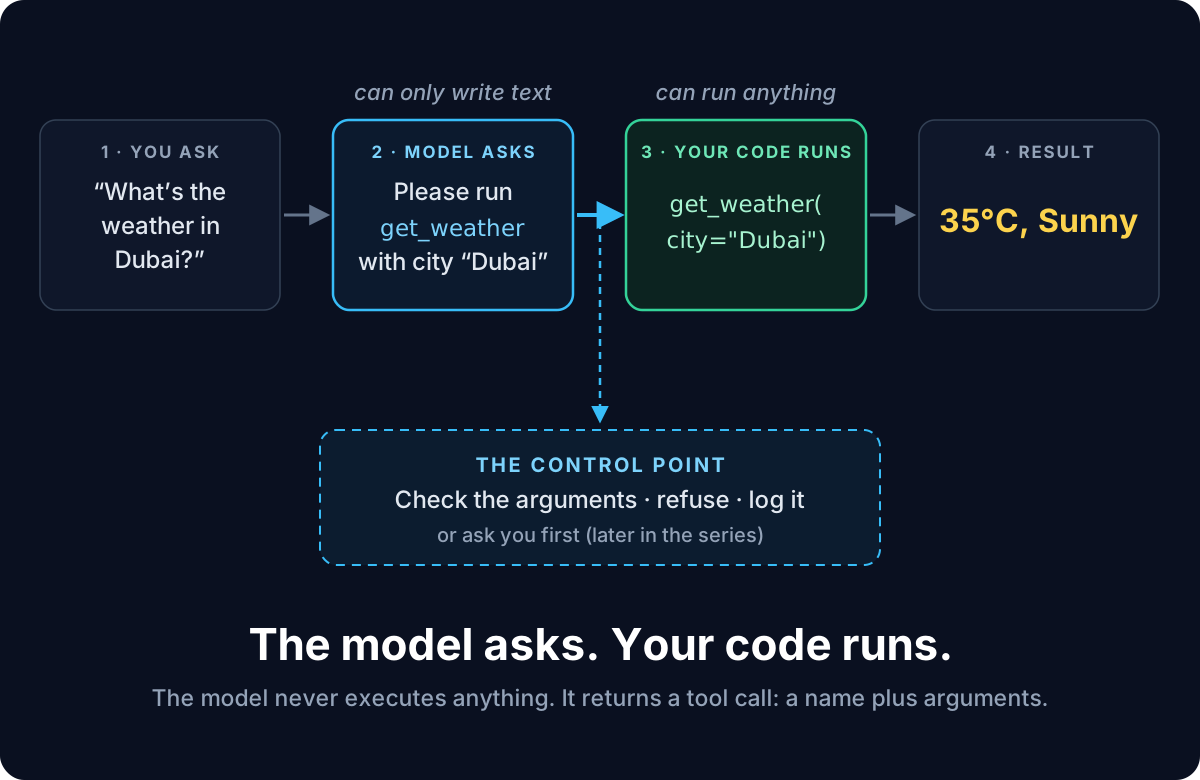
The model did not answer, and it did not run the function. It sent a request:
"Please run get_weather with city="Dubai"."
The model has no hands. A tool is a function the model can ask you to run. Your code runs it.
Step 3: Run what it asks for
Here is the whole program. Save it as tools.py in your agent-lab folder:
import ollama

def get_weather(city: str) -> str:
    """Get the current weather for a city."""
    data = {"London": "15°C, Cloudy", "Dubai": "35°C, Sunny", "Cairo": "30°C, Clear"}
    return data.get(city, "Weather unknown for that city")

response = ollama.chat(
    model="qwen2.5",
    messages=[{"role": "user", "content": "What's the weather in Dubai?"}],
    tools=[get_weather],
)

if response.message.tool_calls:
    for call in response.message.tool_calls:
        print("The model asks for:", call.function.name, call.function.arguments)
        result = get_weather(**call.function.arguments)
        print("Your code ran it:", result)
else:
    print("No tool needed:", response.message.content)
Run it with uv run tools.py:
The model asks for: get_weather {'city': 'Dubai'}
Your code ran it: 35°C, Sunny
Two lines do the work:
if response.message.tool_calls:checks whether the model asked for a tool. It doesn't always. Change the question to "What is 2 + 2?" and it just answers, with no tool call.get_weather(**call.function.arguments)unpacks{'city': 'Dubai'}intoget_weather(city="Dubai"). The function runs on your machine, called by your code.
Why the model only asks
Because your code runs the tool, your code is in charge. Before running anything, it can check the arguments, refuse a bad request, or log what happened.
It can also stop and ask you first: "The agent wants to delete this file. OK?" That confirmation step gets its own article later in the series. For now, remember where it will live: right here, between the model's request and your code running it.
Try it yourself
1. Two cities, one question. Ask "What's the weather in London and Cairo?" How many tool calls come back? Does the program handle them without any change? Why?
2. A second tool. Add this function and pass both tools to the model:
def get_time(city: str) -> str:
    """Get the current local time in a city."""
    return {"Cairo": "14:05", "London": "12:05"}.get(city, "Time unknown for that city")
Then ask "What time is it in London?" The program breaks: it always calls
get_weather. Fix it so it runs whichever function the model asked for.
Hint: call.function.name tells you which one. A dictionary like
{"get_weather": get_weather, "get_time": get_time} does the rest.
Three things to keep
- A tool is a normal Python function, passed with
tools=[...]. - The model never runs it. It returns a tool call: a name plus arguments.
- Your code runs the function, so your code is where control lives.
What's next
Notice what we did not do. We never wrote a prompt like "use get_weather
for weather questions". We only passed the function. Still, the model picked
it and filled in city="Dubai" correctly.
How did it know? In the next article we look at what the model actually
receives when you pass it a function, and why two small lines in your code,
the docstring and city: str, matter more than they look.
And notice the user still hasn't got an answer, only "35°C, Sunny" printed by
our code. Sending that result back to the model so it can reply is how we close
the loop, two articles from now.
Comments
Loading comments…