Build a Real AI Agent · Part 6
Fifteen Lines That Make an Agent
Part 6 of 7Build a Real AI Agent
In the last article we saw how the
model picks a tool. But our program still stops halfway. The model asks for
get_weather, our code runs it, prints "35°C, Sunny", and that's it. The
model never sees the result, so the user never gets an answer.
Today we close the loop. The code is short, and it is the core of every AI agent.
The missing piece: put the result in the list
In article 2 we learned that a conversation is just a Python list of messages, and the model only knows what is in that list.
So to show the model the tool's result, we add it to the list as a new message
with the role tool:
messages.append({"role": "tool", "tool_name": "get_weather", "content": "35°C, Sunny"})
Then we call the model again. Now it sees the question, its own tool request, and the result. It can answer, or ask for another tool.
Ask, run the tool, add the result, ask again. Repeat until the model stops asking for tools. That repeat is the loop.
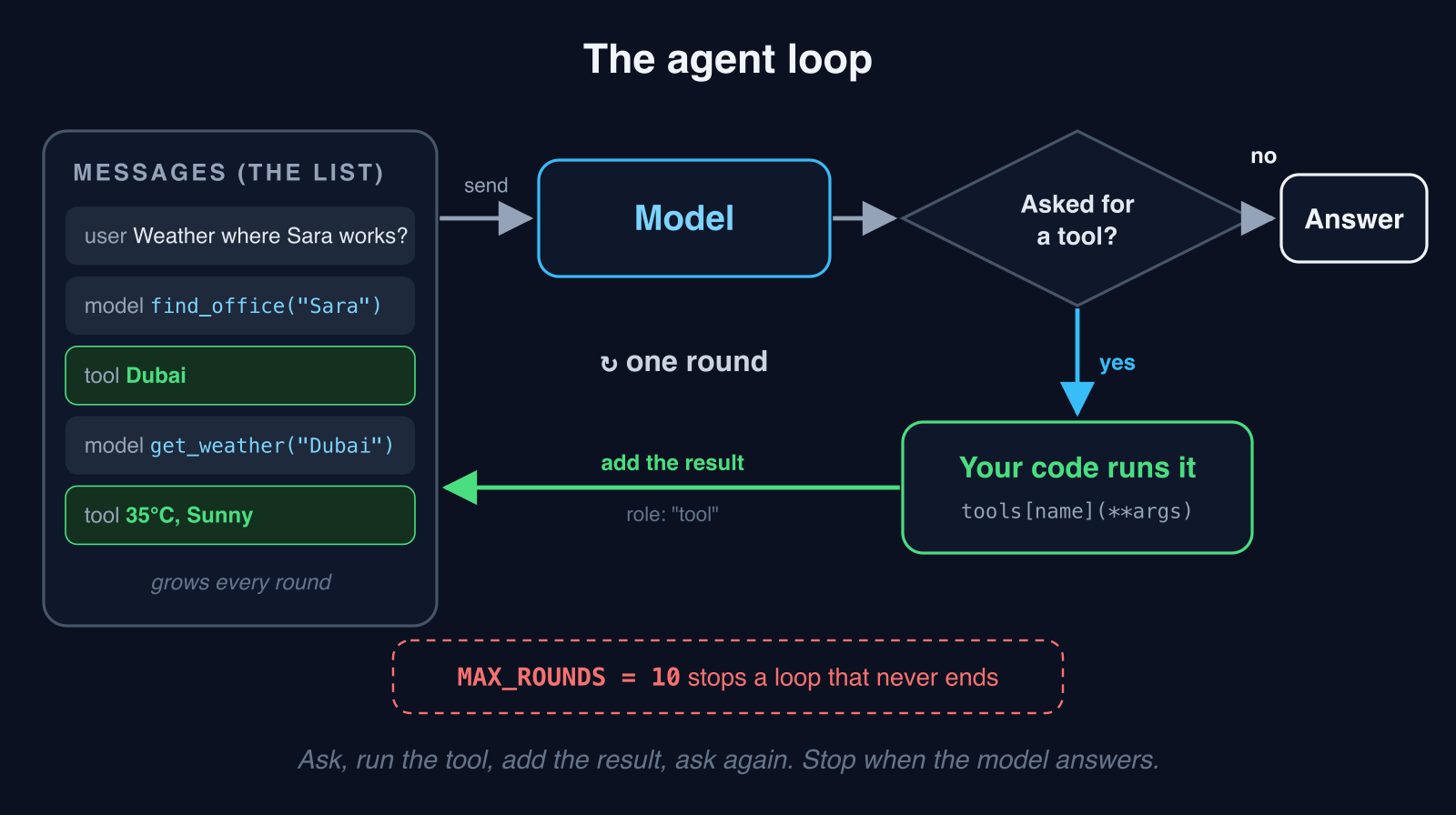
The agent
We need a question that takes two steps, so you can watch the loop go around. Our model doesn't know where Sara works, so it has to find out first, then check the weather there.
Save this as agent.py in your agent-lab folder:
import ollama

def find_office(person: str) -> str:
    """Find the city where a team member works."""
    return {"Sara": "Dubai", "Omar": "London"}.get(person, "Unknown person")

def get_weather(city: str) -> str:
    """Get the current weather for a city."""
    data = {"London": "15°C, Cloudy", "Dubai": "35°C, Sunny", "Cairo": "30°C, Clear"}
    return data.get(city, "Weather unknown for that city")

tools = {"find_office": find_office, "get_weather": get_weather}

messages = [
    {"role": "system", "content": "Call one tool at a time. Wait for its result before calling the next."},
    {"role": "user", "content": "What's the weather where Sara works?"},
]
MAX_ROUNDS = 10

for round_number in range(1, MAX_ROUNDS + 1):
    response = ollama.chat(model="qwen2.5", messages=messages, tools=list(tools.values()))
    messages.append(response.message)                # keep what the model said

    if not response.message.tool_calls:              # no request: this is the answer
        print("Answer:", response.message.content)
        break

    for call in response.message.tool_calls:         # run what it asked for
        name, args = call.function.name, call.function.arguments
        result = tools[name](**args)
        print(f"Round {round_number}: {name}({args}) -> {result}")
        messages.append({"role": "tool", "tool_name": name, "content": result})
else:
    print("Stopped: too many rounds.")               # only if we never hit break
Run it with uv run agent.py:
Round 1: find_office({'person': 'Sara'}) -> Dubai
Round 2: get_weather({'city': 'Dubai'}) -> 35°C, Sunny
Answer: The current weather in Dubai, where Sara works, is 35°C and sunny.
The for loop is about fifteen lines. That's the agent.
What happened, round by round
| Round | The model sees | It decides |
|---|---|---|
| 1 | The question | "I don't know where Sara works. Call find_office("Sara")." |
| 2 | The question + "Dubai" | "Now call get_weather("Dubai")." |
| 3 | The question + "Dubai" + "35°C, Sunny" | "I have everything. Answer." |
Look at what nobody wrote. There is no if "weather" in question, no "first
find the office, then get the weather". The model chose each step after seeing
the result of the last one. Your code just keeps the loop turning.
This pattern has a name: ReAct, short for Reason and Act. Think, act, look at the result, think again.
Three lines worth a second look
messages.append(response.message) keeps the model's own tool request in
the list. Without it, the model would see a result for a request it doesn't
remember making.
"tool_name": name tells the model which tool this result came from. It
matters when the model asks for several tools in one round.
The system message. Small models like qwen2.5 sometimes try to save time:
they call find_office and get_weather at the same time, and guess the city
for the second one. One line telling it to wait for each result fixed that in
every run we tried.
Remember from article 4 that your code runs
every tool. In the loop, that's the line result = tools[name](**args). Later
in the series, that's where we'll add a confirmation step: "The agent wants to
do this. OK?"
The brake: MAX_ROUNDS
What if the model never stops asking for tools? Without a limit, the program runs forever. With a paid model, so does your bill.
for round_number in range(1, MAX_ROUNDS + 1) is the brake. Ten rounds is
plenty for questions like ours. If the model hasn't answered by then, the
else: line runs and we stop.
A loop that can't stop is a bug.
Try to break it
Delete the line that adds the tool result:
messages.append({"role": "tool", "tool_name": name, "content": result})
Run it again. Your code still calls find_office and gets Dubai, but the
model never sees it. When we tried, qwen2.5 returned an empty answer. Other
models may ask for the same tool again, or make up an answer.
That one experiment shows the whole idea: an agent only works because the results flow back into the conversation.
Try it yourself
1. Two people. Ask "Is it warmer where Sara works or where Omar works?" How many rounds does it take? Which tools run in the same round, and why is that OK this time?
2. Remove the system message. Delete the "role": "system" line and run
the agent five times. Does the model always wait for find_office before
calling get_weather? What city does it use when it doesn't wait?
Three things to keep
- The tool result goes back into the list as a
toolmessage. - Keep looping until the model stops asking for tools. That reply is the answer.
- Always cap the loop with
MAX_ROUNDS.
What's next
Our agent can act. But stop the program and run it again, and it has forgotten everything. In the next article we give it a memory you can open in Notepad.
Comments
Loading comments…