Build a Real AI Agent · Part 5
How a Model Reads Your Function
Part 5 of 7Build a Real AI Agent
In the last article we passed get_weather
to the model, and it asked for get_weather(city="Dubai"). We never told it
what the function does. So how did it know?
It read a short description of your function. Not your code. This article shows you that description, and how to write functions the model understands.
What the model actually receives
When you write tools=[get_weather], the ollama library turns your function
into a small block of JSON called a schema. That schema is what goes to the
model.
You can print it yourself. Save this as schema.py in your agent-lab folder:
import json
from ollama._utils import convert_function_to_tool   # the helper ollama uses internally

def get_weather(city: str) -> str:
    """Get the current weather for a city."""
    data = {"London": "15°C, Cloudy", "Dubai": "35°C, Sunny", "Cairo": "30°C, Clear"}
    return data.get(city, "Weather unknown for that city")

schema = convert_function_to_tool(get_weather)
print(json.dumps(schema.model_dump(exclude_none=True), indent=2))
Run it with uv run schema.py:
(convert_function_to_tool is an internal ollama helper, so it may move in a
future version. This was tested with ollama 0.6.3.)
{
  "type": "function",
  "function": {
    "name": "get_weather",
    "description": "Get the current weather for a city.",
    "parameters": {
      "type": "object",
      "required": [
        "city"
      ],
      "properties": {
        "city": {
          "type": "string",
          "description": ""
        }
      }
    }
  }
}
Look at where each part came from:
"name"is the function name."description"is the docstring."parameters"comes from the type hints: one argument calledcity, of typestring.
And look at what is missing: the dictionary, the return, every line of the
function body. The model never sees how your tool works. Only what it is
called, what it says it does, and what it takes.
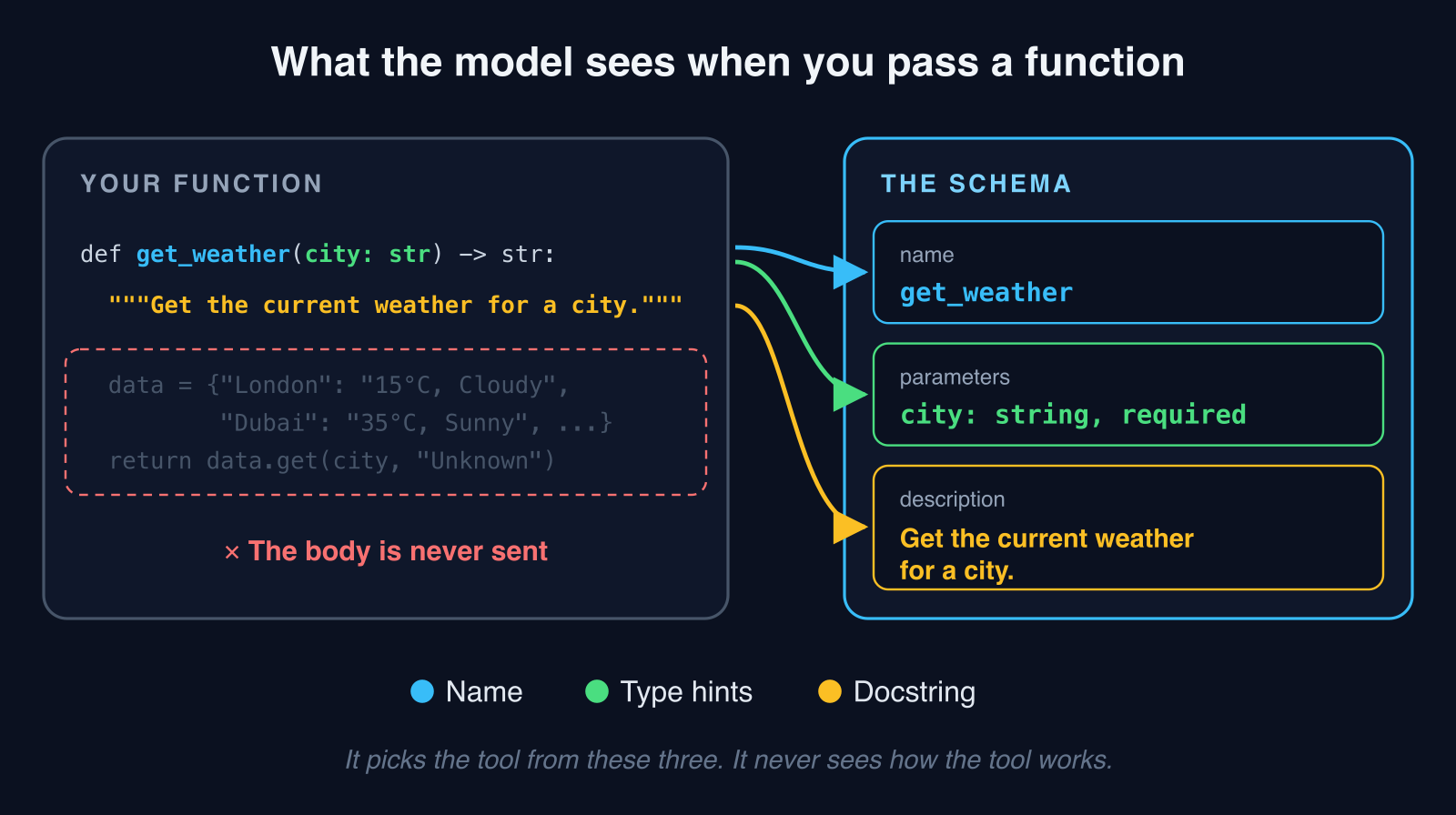
The model chooses a tool by its name, its docstring and its type hints. Your code inside the function is invisible to it.
Proof: hide the name, keep the docstring
To see the docstring at work, take away the name's help. Two tools with
meaningless names, helper_one and helper_two, that take the same argument.
Only the docstrings differ. Save as choose.py:
import ollama

def helper_one(city: str) -> str:
    """Get the current weather for a city."""
    return "35°C, Sunny"

def helper_two(city: str) -> str:
    """Get the current local time in a city."""
    return "14:05"

for question in ["What's the weather in Dubai?", "What time is it in Cairo?"]:
    response = ollama.chat(
        model="qwen2.5",
        messages=[{"role": "user", "content": question}],
        tools=[helper_one, helper_two],
    )
    for call in response.message.tool_calls or []:
        print(question, "->", call.function.name, call.function.arguments)
Run it with uv run choose.py:
What's the weather in Dubai? -> helper_one {'city': 'Dubai'}
What time is it in Cairo? -> helper_two {'city': 'Cairo'}
Both right. The names and the argument are the same, so the docstrings are what tell the two tools apart.
Now replace the two docstrings with lazy ones, """Helper function.""" and
"""Another helper.""", and run it again:
What's the weather in Dubai? -> helper_one {'city': 'Dubai'}
What time is it in Cairo? -> helper_one {'city': 'Cairo'}
The time question went to the weather tool. You didn't change one line of logic. You changed the description, and the model got it wrong.
Your results may differ with another model or another run. Descriptions influence the model's choice; they don't guarantee it.
Describe the arguments too
The schema above had "description": "" for city. You can fill it. Add an
Args: section to the docstring, and ollama copies each line into the
schema:
def get_weather(city: str, unit: str) -> str:
    """Get the current weather for a city.

    Args:
        city: The city name, e.g. "Dubai".
        unit: "celsius" or "fahrenheit".
    """
Now the model knows what a good city looks like, and which values unit
accepts. Ask "What's the weather in Dubai in Fahrenheit?" and you get:
{'city': 'Dubai', 'unit': 'fahrenheit'}
How to write a tool the model understands
- A clear name.
get_weather, nothelperorgw. - A one-line docstring that says what it does. This is how the model chooses between tools.
- A type hint on every argument.
city: str,days: int. Without one, the model has to guess the type. - An
Args:line for anything not obvious. An example value or the list of allowed values.
Your docstring is no longer just a note for other programmers. With ollama, it becomes the tool description the model reads every time it decides what to do.
Try it yourself
1. Break it, then fix it. Run choose.py with the lazy docstrings. Then
fix only the names: rename helper_one to get_weather and helper_two to
get_time, keeping the lazy docstrings. Does the model choose correctly again?
What does that tell you about names?
2. Add a days argument. Give get_weather a second argument,
days: int, described in Args: as "How many days ahead, 0 for today." Run
schema.py and find days in the output. What type did it get? Then ask the
model "What's the weather in Cairo tomorrow?" and print the arguments it
sends.
Three things to keep
- The model receives a schema: name, docstring and type hints. Never the body.
- The docstring is how it chooses between tools.
- The type hints and
Args:tell it what to send.
What's next
We can make the model ask for a tool, and our code can run it. But we still
stop halfway: the result, "35°C, Sunny", never goes back to the model, so the
user never gets an answer. Next article, we send it back and close the loop.
That is the foundation of the agent loop we'll build from there.
Comments
Loading comments…